More than One USANA Email Account
At this time, each distributorship is allowed only one USANA Email account.
At this time, each distributorship is allowed only one USANA Email account.
To move a message to a folder in USANA Email simply drag and drop the item into the desired folder.
To remove an attachment from an USANA e-mail, un-check the check box that appears next to the attached document name on the e-mail screen when you are sending or forwarding. This will remove the attachment when it is sent/forwarded.
To rename an existing folder in USANA Email:
To add an address from your Address Book in the email to a new message:
USANA’s Email service provider, Zimbra, does have security and filters in place to help reduce spam. The security settings should filter out most spam. Unfortunately, spammers change their settings continuously and sometimes can break through. You can report spam, or “junk,” by selecting the items and clicking on the “Junk” link.
There is a limited amount of space (1GB) available in the USANA Email. If your mailbox is too full, you may be unable to compose or forward messages. We suggest that you clean out your mailbox, folders, and trash. This should resolve the issue.
If you continue to have difficulty, please contact customer service at mailto:CustomerService@USANAinc.com and they will be able to assist you further.
Associates are allotted 1 gigabyte (1GB) of space in their USANA Email account. Space used in all folders (including Trash and Sent) will count toward the total space allotment. Please be sure to delete messages in the Trash folder periodically to maximize the space you have available to use.
The address book is included in the 1 GB of space allotted to your email box.
To send a message to a mailing list (contact group) in USANA Email:
 at the top right-hand side of the page on The Hub, you will be taken to the main page of email. Your default usana.com e-mail address will look similar to 1234@usana.com.” From there, you will want to personalize your e-mail address: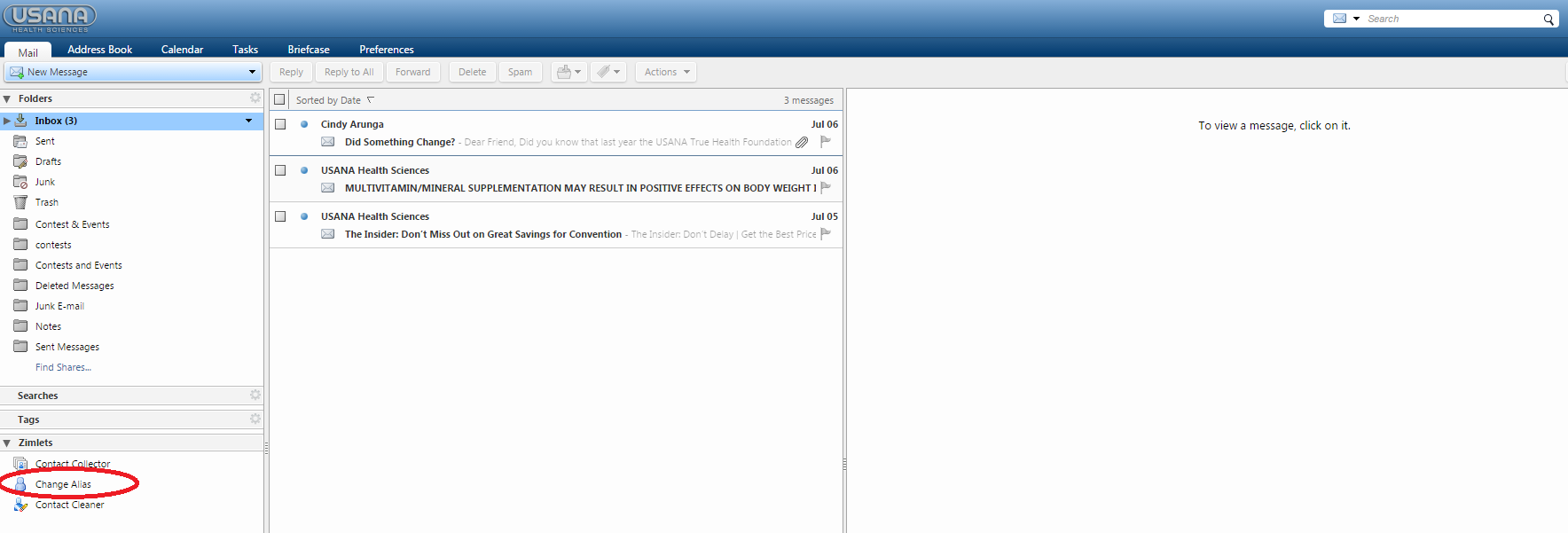
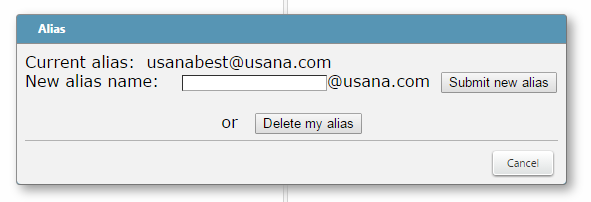
The name you enter must be unique from other usana.com accounts and cannot contain any spaces or special characters. If the name you pick does not meet these criteria, you will get a message telling you so, and you will need to select another name. If everything is OK, you will see an “Alias is currently enabled” message.
Your account has 1GB of space. To maximize your useable space, be sure to delete mail you do not need from you Inbox as well as from your Trash folders. You will find an “Empty Trash Folder” link in the Trash folder that will allow you to clean out this folder.
The email in the upper right-hand corner of the page will not change over to the alias; it will remain the ID#@usana.com (ex. 12345@usana.com).