The first time you access “Email” under the “My Account” icon

at the top right-hand side of the page on The Hub, you will be taken to the main page of email. Your default usana.com e-mail address will look similar to
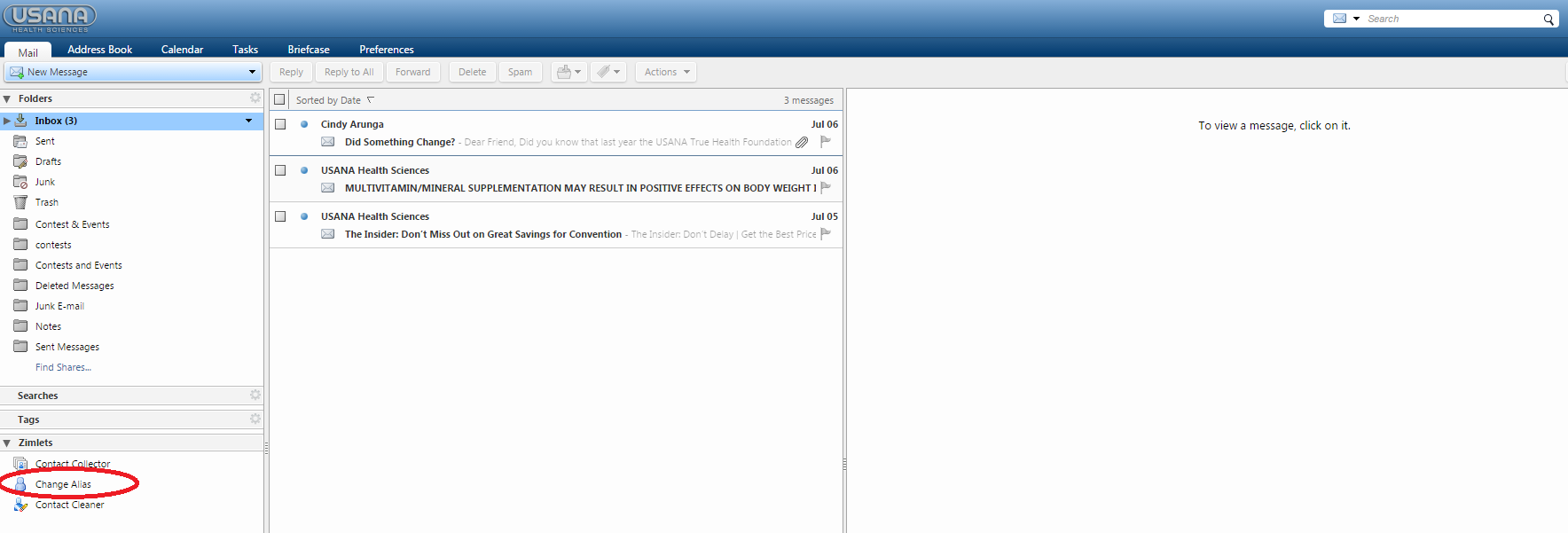
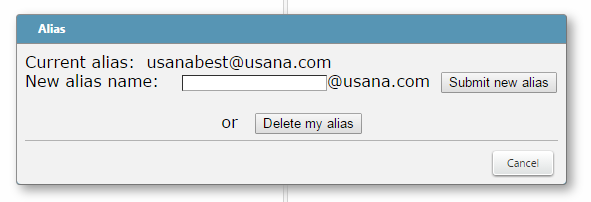
1234@usana.com.” From there, you will want to personalize your e-mail address:
The name you enter must be unique from other usana.com accounts and cannot contain any spaces or special characters. If the name you pick does not meet these criteria, you will get a message telling you so, and you will need to select another name. If everything is OK, you will see an “Alias is currently enabled” message.
Your account has 1GB of space. To maximize your useable space, be sure to delete mail you do not need from you Inbox as well as from your Trash folders. You will find an “Empty Trash Folder” link in the Trash folder that will allow you to clean out this folder.
The email in the upper right-hand corner of the page will not change over to the alias; it will remain the ID#@usana.com (ex. 12345@usana.com).