Add/Change Photo in the Profile Manager

It is simple to change the photo saved in the “Profile Manager”:
  • Log on to The Hub
  • Click on the “My Account” icon
  • Click on “Profile Manager” to go to your account settings
  • Click on “Profile Manager” on the left-side navigation panel
  • Click on “Change Photo” in the upper left-hand corner
  • Click on “Browse” or “Choose File”
  • Locate and double-click the picture you want to use
  • Click on “Submit”

This will replace the existing picture with the new photo.

Remove a File from the Media Center

To remove a file from “My Library” in the Share USANA Media Center, locate and open the file from “My Library” and click on “Delete.”

If the file has been sent out or shared, it is not possible to delete it. However, you can archive the file using the archive filter on the left, so that it will not show on the main page.

View Media Center Videos in Full Screen

To view the Media Center videos in full screen, click on the two diagonal arrows on the bottom right side of the player.

Product Flyer

To locate product flyers:

  • Log on to The Hub
  • Click on “My Business”
  • Select “Share USANA Media Center” from the “Prospecting” heading
  • Select “Library” from the left
  • Select “Master Library” at the top of the screen
  • Select “Flyers” under “Type”
  • Under “Topic” and select “Products”

Emailing Prospecting Videos

To share the prospecting videos, please use the following:

  • Log on to The Hub
  • Click on “My Business”
  • Select “Share USANA Media Center” from the “Prospecting” heading
  • Click on “Library”
  • Select Media Type “Video”
  • Locate the video you would like to send
  • Click on the envelope icon
  • Fill out the eCard information
  • Click “Send eCard”

Download a Video from the Media Center

All videos in the Media Center are available to download.

  • Log onto The Hub
  • Click on “My Business”
  • Select “Share USANA Media Center” from the “Prospecting” heading
  • Click on “Library”
  • Click on “Videos” under “Media Type”
  • Locate the video you wish to download
  • Click on the video
  • On the top-right of the video, there will be a line of icons; click the “Download File” icon

Panama

Unfortunately, USANA is not open for business in Panama. USANA does not publish long-term plans on opening in other countries, but will make information available publicly as soon as we are prepared. At this time, there is no information regarding an opening in Panama.

Markets and Shipping Information

Athlete NSF Certified for Sport

USANA has been providing high-quality nutritional supplements to world-class athletes for many years. During that time, there has never been an athlete who has tested positive for a banned substance as a result of taking our products. In the last few years, we have teamed up with two testing laboratories to provide third-party testing of a number of our key products to further ensure the purity of our products that athletes take.

Seven of our products are currently tested for the presence of WADA banned substances under the NSF Certified for SportTM program (www.nsfsport.com).

These products are:

  • Vita Antioxidant (Item #883)
  • Core Mineral (Item #882)
  • Procosa (Item #887)
  • Proflavanol C100 (Item #886)
  • MagnaCal D (Item #885)
  • CopaPrime (Item #687)
  • BiOmega (Item #889)
  • Prenatal Cellsentials (Item #893)

We also offer five of these products in a convenient SportsPak (Item #880), excluding BiOmega, CopaPrime, and Prenatal Cellsentials.

Current professional and amateur sport organizations that trust their nutrition to USANA include the Women’s Tennis Association, US Speedskating, US Ski and Snowboard, Nordiq Canada, Biathlon Canada, USA Luge, AFC Bournemouth, members of the Korean Speed Skating team and more.

USANA’s NSF Certified for Sport products are available to order through customer service at 888-950-9595 or email at CustomerService@USANAinc.com.

Upon placing your order, please state that you would like to place an order for “NSF Certified for Sport Products.”

More about NSF Certified for Sport®

To search for USANA NSF Certified for Sport® products, enter “USANA” in the Product/Company Name field and click “Search.”

Stock

You do not have to be a USANA Brand Partner to purchase USANA stock. Anyone can do this.

To purchase USANA shares, you must work with a brokerage firm such as Sharebuilder, Scottrade, Fidelity, Etrade, etc.

When shares are purchased, your shares will be held in your brokerage account, and you will not receive a stock certificate unless you specifically request one.

A transfer agent is a record keeper for a company like USANA to track all their shareholders and how many shares they own. USANA’s transfer agent is Broadridge Financial Solutions, Inc. They can be contacted through their website at https://www.broadridge-ir.com/resources/transfer-agent/default.aspx or by calling shareholder services at (877) 830-4932.

To recover a lost or stolen stock certificate, contact Broadridge Financial Solutions, Inc.

USANA’s stock split history was August 4, 1998 (2 for 1), October 31, 2003 (2 for 1), and November 23, 2016 (2 for 1).

USANA currently does not, and never has, paid dividends. This does not mean a dividend will not be considered in the future by the board of directors.

Current USANA stock prices can be accessed on the Investors Relations section of www.usana.com.
Ask the Scientists

Science Information Services, a division of Research and Development (R&D), interprets current nutritional science research to provide accurate science-based information to support, educate, and inform Brand Partners and customers. They work directly with R&D in developing new products and product reformulations. In addition, they coordinate with product managers to defend health claims, provide customer feedback, and support product marketing strategies.

To locate the Ask the Scientists:

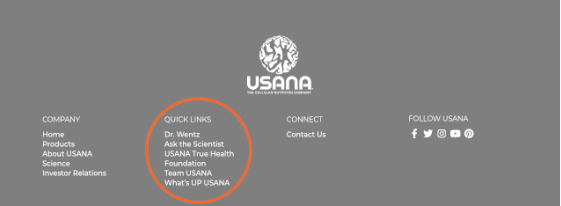
  • Log on to The Hub
  • Scroll to the bottom of the page
  • Locate and select “Ask the Scientists” under the Quick Links heading

