Network
All the participants of a multilevel marketing business are referred to as the Network.
All the participants of a multilevel marketing business are referred to as the Network.
Movin’ on up! Rank advancement feels good, right? Of course it does. And it doesn’t matter whether you’re going from Believer to Builder or Bronze Director to Silver Director—it’s a big deal.
USANA has created leadership levels to help direct your short-term goals and establish milestones to help you measure your progress as you work toward your ultimate goal.
Each leadership level is earned as you produce specific volume requirements. These requirements are based on the total base Commission Volume Points (CVP) generated in all of your Business Centers together, and not from a single Business Center. Advancing to the rank of Gold Director or above will not require you to max out a single Business Center.
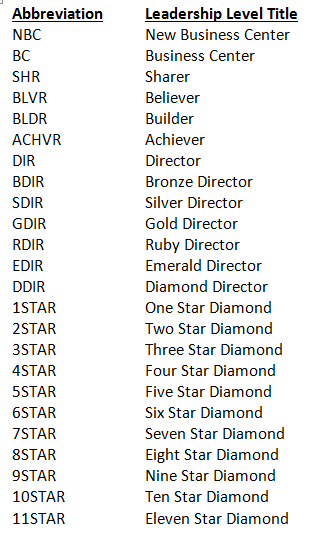
The levels of leadership are defined below. Use the chart and the experience of previous Associates to establish reasonable goals for your business.
SHARER 50 CVP for one week
BELIEVER 100 CVP for one week
BUILDER 200 CVP for one week
ACHIEVER 400 CVP for one week
DIRECTOR 600 CVP for one week
BRONZE DIRECTOR 800 CVP for one week
SILVER DIRECTOR 1,000 CVP for one week
GOLD DIRECTOR 1,000 CVP for four consecutive weeks
RUBY DIRECTOR 2,000 CVP for four consecutive weeks
EMERALD DIRECTOR 3,000 CVP for four consecutive weeks
DIAMOND DIRECTOR 4,000 CVP for four consecutive weeks
1-STAR DIAMOND 5,000 CVP for four consecutive weeks
2-STAR DIAMOND 6,000 CVP for four consecutive weeks
3-STAR DIAMOND 7,000 CVP for four consecutive weeks
4-STAR DIAMOND 8,000 CVP for four consecutive weeks
5-STAR DIAMOND 9,000 CVP for four consecutive weeks
6-STAR DIAMOND 10,000 CVP for four consecutive weeks
7-STAR DIAMOND 11,000 CVP for four consecutive weeks
8-STAR DIAMOND 12,000 CVP for four consecutive weeks
9-STAR DIAMOND 13,000 CVP for four consecutive weeks
10-STAR DIAMOND 14,000 CVP for four consecutive weeks
11-STAR DIAMOND 15,000 CVP for four consecutive weeks
12-STAR DIAMOND 16,000 CVP for four consecutive weeks
13-STAR DIAMOND 17,000 CVP for four consecutive weeks
14-STAR DIAMOND 18,000 CVP for four consecutive weeks
15-STAR DIAMOND 19,000 CVP for four consecutive weeks
16-STAR DIAMOND 20,000 CVP for four consecutive weeks
17-STAR DIAMOND 21,000 CVP for four consecutive weeks
This information can also be found on The Hub:
The Elite Bonus is calculated quarterly (every three months or every 13 weeks) on a Saturday-to-Friday basis: January–March, April–June, July–September, and October–December.
USANA’s Earnings Reconciliation Statement provides a detailed, weekly breakdown of your earnings.
Some of the earnings listed on this statement are not represented on your weekly check stubs, since they are typically additional earnings like prizes awarded to contest winners.
To access your Earnings Reconciliation Statement:
 on the top right-hand side of the page
A Form 1099-NEC is an earnings statement reported by USANA to the U.S. Internal Revenue Service in accordance with laws for non-employee compensation, otherwise known as commissions, of earnings of more than $600 US during that tax year.
Only U.S. sole proprietor or business* Brand Partners and/or U.S. Affiliates who earn $600 or more will be able to access a Form 1099. Corporations or Brand Partner’s earning less than $600 can retrieve an Earnings Reconciliation Statement from The Hub.
*Business type includes sole proprietorships doing business under an assumed name, LLCs, partnerships, joint ventures, trusts, etc.
Form 1099-NEC or reconciliation statements are usually available online around mid-January the following tax year. The Hub currently contains tax Information from 2013 forward.
2025 Form 1099s will be made available on January 20, 2026.
In an effort to reduce USANA’s carbon footprint, all 1099-NEC forms and more detailed reconciliation statements will not be mailed automatically, except in special cases outlined in the next section.
Forms are accessible on The Hub.
Brand Partner’s whose accounts have been canceled, transferred, or have a tax identification number active on multiple accounts will not be able to access their 1099-NEC Form or Earnings Reconciliation Statement online.
If an account has been canceled or transferred during 2025 or one tax identification number is active on multiple accounts, the 1099 Form will be automatically mailed.
Note: Income verification requests will not be accepted for these individuals until February 18, 2026, to allow time for mailed forms to be delivered before a new request is submitted.
A request for mail, fax, or email of a 1099 or Earnings Reconciliation Statement can be requested through customer service.
Please note that Income Verification Requests will only be accepted for Brand Partners or Affiliates who
If a U.S. Brand Partner or Affiliate would like to have their earnings information faxed or emailed to them, they must complete the “Permission to Fax” form available through customer service.
The Hub contains tax information dating back to 2013. If you need to request tax information for a year before 2013, please request it through customer service.
If you would like a record of your annual spending, please refer to the packing slips that come with each order.
You can view and print your packing slips on The Hub.
Each USANA commission week begins on Saturday at 12:00 a.m. (MST/MDT) and ends on Friday at 11:59 p.m. (MST/MDT).
All order(s) must be received and completed by the close of the commission week. Because USANA is an international company, local times in each market will vary.
The following site can be utilized to calculate exact local times for a specific market by entering the MST/MDT time:
If an incorrect placement was made due to an Associate error, you can request a change in the line of sponsorship within 10 days of enrollment to correct the mistake. When making such a request, you must also obtain written consent from your Sponsor and pay the required placement change fee. However, if you already have any Team Below in place at the time of the request, no change will be permitted in the line of sponsorship. If the change is approved, commissions and bonuses earned will be adjusted accordingly. Please note that no change of placement will be approved if USANA has not received a signed application.
There are many benefits of reaching the level of Gold Director with USANA:
Visa and MasterCard gift cards can be used as a form of payment for orders placed with USANA, including Auto Orders. However, if a credit is later requested, we are required to place refund on the same card charged; therefore, if the gift card was thrown away, a credit can not be issued.
The following is an excerpt from the Visa Web site. Please visit the card issuer’s Web site for complete details about using gift cards:
Returning Items
If you decide to return an item that was purchased with your Visa gift card, you may be asked to present the card to process that return. Be sure to keep your gift card-even after the balance is depleted-in case you need to return any purchased items.
If the store policy is to credit the card used for purchase (rather than providing you cash or store credit) the value will be credited back to the card within three to seven days of the return.